Berlin, August 8, 2018 – The Document Foundation announces LibreOffice 6.1, the second major release of the LibreOffice 6 family presented in January 2018, with a significant number of new and improved features:
- Colibre, a new icon theme for Windows based on Microsoft’s icon design guidelines, which makes the office suite visually appealing for users coming from the Microsoft environment;
- A reworked image handling feature, which is significantly faster and smoother thanks to a new graphic manager and an improved image lifecycle, with some advantages also when loading documents in Microsoft proprietary formats;
- The reorganization of Draw menus with the addition of a new Page menu, for better UX consistency across the different modules;
- A major improvement for Base, only available in experimental mode: the old HSQLDB database engine has been deprecated, though still available, and the new Firebird database engine is now the default option (users are encouraged to migrate files using the migration assistant from HSQLDB to Firebird, or by exporting them to an external HSQLDB server);
- Significant improvements in all modules of LibreOffice Online, with changes to the user interface to make it more appealing and consistent with the desktop version,
- An improved EPUB export filter, in terms of link, table, image, font embedding and footnote support, with more options for customizing metadata;
- Online Help pages have been enriched with text and example files to guide the users through features, and are now easier to localize.
LibreOffice 6.1’s new features have been developed by a large community of code contributors: 72% of commits are from developers employed by companies sitting in the Advisory Board like Collabora, Red Hat and CIB and by other contributors such as SIL and Pardus, and 28% are from individual volunteers.
In addition, there is a global community of individual volunteers taking care of other fundamental activities such as quality assurance, software localization, user interface design and user experience, editing of help system text and documentation, plus free software and open document standards advocacy at a local level.
A video summarizing the top new features of LibreOffice 6.1 is available on YouTube: https://www.youtube.com/watch?v=JvoCpnwGNFU.
Enterprise deployments
LibreOffice 6.1 represents the bleeding edge in term of features for open source office suites, and as such is targeted at technology enthusiasts, early adopters and power users.
For any enterprise class deployment, TDF maintains the more mature LibreOffice 6.0, which should be sourced from a company providing a Long Term Supported version of the suite (they are all members of TDF Advisory Board, and are listed here: http://www.documentfoundation.org/governance/advisory-board/).
Also, value-added services for migrations and trainings, to support enterprise class deployments in large organizations, should be sourced from certified professionals (list available here: http://www.libreoffice.org/get-help/professional-support/).
LibreOffice is deployed by large organizations in every continent. A list of some large or significant migrations announced in the media is available on the TDF wiki: https://wiki.documentfoundation.org/LibreOffice_Migrations.
Availability of LibreOffice 6.1
LibreOffice 6.1 is immediately available from the following link: https://www.libreoffice.org/download/. Minimum requirements for proprietary operating systems are Microsoft Windows 7 SP1 and Apple macOS 10.9. Builds of the latest LibreOffice Online source code are available as Docker images: https://hub.docker.com/r/libreoffice/online/.
LibreOffice Online is fundamentally a server service, and should be installed and configured by adding cloud storage and an SSL certificate. It might be considered an enabling technology for the cloud services offered by ISPs or the private cloud of enterprises and large organizations.
LibreOffice users, free software advocates and community members can support The Document Foundation with a donation at https://www.libreoffice.org/donate.
LibreOffice 6.1 is built with document conversion libraries from the Document Liberation Project: https://www.documentliberation.org.
Press Kit
The press kit, with background documents – Hybrid PDF, opened from within LibreOffice can be edited as normal ODT files – and high-resolution images, is here: https://nextcloud.documentfoundation.org/s/3B8ZecMNMcWcxHy.
LibreOffice 6.1: a background on the user interface
For the last eight years, LibreOffice’s user interface guidelines have been inspired by a consistent end-user-driven and context-based approach (according to the available screen real estate, the application and the specific task), to provide the best mix between power (the level of control over features) and simplicity (the number of options available on the screen).
The Design Team at The Document Foundation has made several changes to the different icon styles for LibreOffice 6.1, to improve the visual appearance of the office suite and provide a more consistent look and feel with operating systems and desktop environments.
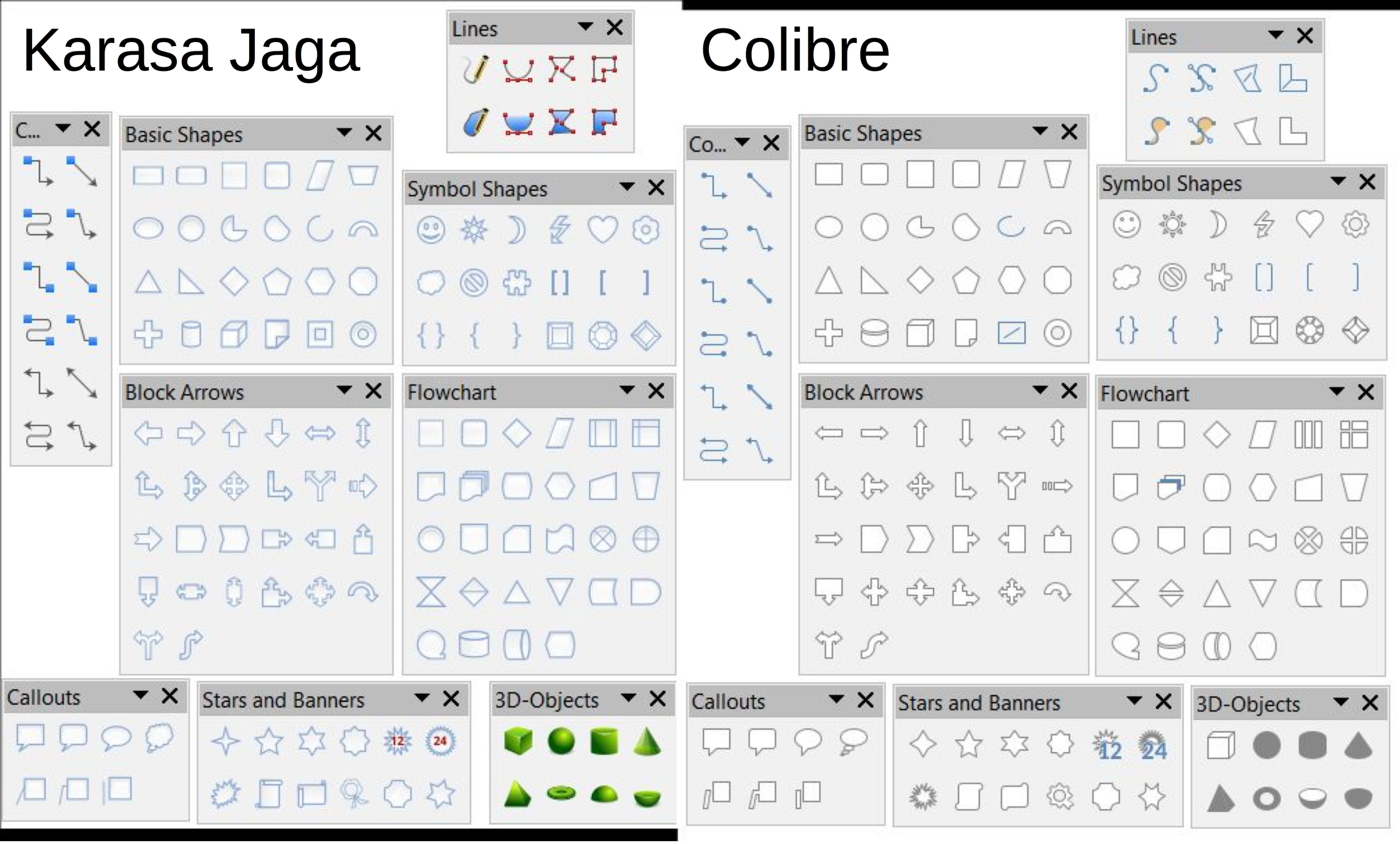
Colibre, a completely new icon style designed from scratch by the Austrian volunteer Andreas Kainz, is now the default on Windows. Colibre is entirely based on icon design guidelines from Microsoft, which means that the style uses the same color scheme as Microsoft Office and offers a consistent look and feel with the proprietary office suite. The design of each icon has been inspired by Breeze and Elementary.
Karasa Jaga, a new icon style originally created for Sundara OS and designed by the Indonesian volunteer Rizal Muttaqin, has also been added. Karasa Jaga, which means “feel the future” in the Sundanese language spoken in western Java, has been heavily inspired (and is derived) from the now discontinued Oxygen icon style.
Elementary is now the default icon style on Gnome-based desktop environments, while Sifr has replaced HiContrast as the default high contrast icon style.
Industrial and Oxygen have been removed because of missing maintenance and SVG support. All legacy icon styles are available as extensions.
In addition, the Notebookbar – which is still experimental – has been significantly improved and has been completed for Writer, while it is still work in progress for the other modules in the suite. The objective is to provide a solution as powerful and simple as the current default LibreOffice user interface, which is based on toolbars.
Looking forward, it looks like LibreOffice user interface – for which the source code is available on our repository at https://github.com/LibreOffice – has inspired the future evolution of some proprietary office suites, which in the last 10 years have chosen a different – and obviously obfuscated – approach.
Contributors to LibreOffice 6.1
LibreOffice 6.1 represents the global effort of a large and diverse community of enterprise-sponsored and volunteer contributors.

This is a list of the people who have contributed a new feature or an improvement to the software or the user interface, or a new localization.
Adolfo Jayme Barrientos
Andrea Gelmini
Andreas Kainz
Armin Le Grand, CIB
Ashod Nakashian, Collabora
Ayaspell
Belkacem Mohammed
Berend Ytsma
Caolán McNamara, Red Hat
DaeHyun Sung
Dennis Francis, Collabora
Dennis Roczek
Eike Rathke, Red Hat
Furkan Tokac
Gabor Kelemen
Gülşah Köse, Pardus
Heiko Tietze
Henry Castro, Collabora
Ilmari Lauhakangas
Jan Holešovský, Collabora
Joseph S. Maza
Kohei Yoshida
Kompilainenn
László Németh, FSF.hu
Lera Goncharuk
Luboš Luňák, Collabora
Marco Cecchetti, Collabora
Mark Hung
Maxim Monastirsky
Merzouk Ouchenem
Michael Meeks, Collabora
Michael Stahl, CIB
Michael Wolf
Mike Kaganski, Collabora
Miklos Vajna, Collabora
Muhammet Kara, Pardus
Nabil Semɛun
Nithin Kumar Padavu
Olivier Hallot, TDF
Pranav Kant, Collabora
Rizal Muttaqin
Samuel Mehrbrodt, CIB
Serge Krot, CIB
Slimane Amiri
Sophia Schröder
Stanislav Horáček
Stephan Bergmann, Red Hat
Szymon Kłos, Collabora
Tamás Bunth, Collabora
Tomaž Vajngerl, Collabora
Tor Lillqvist, Collabora
V. Stuart Foote
Yasin Bouklif
Yazid Bouhamam
Yousuf Philips
Xisco Faulí, TDF
Of course, the release of LibreOffice 6.1 has been possible thanks to the invaluable contributions of many other people, who have donated their time for user interface design and user experience improvements, localization in over 100 different languages, quality assurance, documentation and online help, and other product related activities, including marketing and communications.
In addition, many other people have supported end users on mailing lists, online resources and social media, answering questions and providing guidance to solve any kind of issue, from a simple download query to the most sophisticated pivot table questions.