Hyperlink dialog improvements from Siddhi Salunkhe

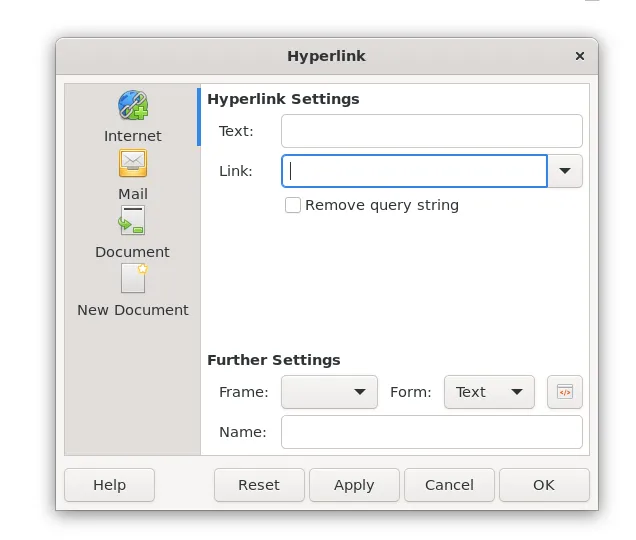
LibreOffice hyperlink dialog box

As part of the Outreachy programme, which aims to bring a wider variety of people into the tech industry, Siddhi Salunkhe has been working on improvements to the LibreOffice hyperlink dialog box. It now has standard tabs, and will be easier to maintain going forward. Thanks to Ilmari and Heiko at TDF for providing mentoring during this project! The improvements will be in LibreOffice 26.8, later this year.

Click here for Siddhi’s full report

LibreOffice Online: a fresh start

LibreOffice logo and words A Fresh Start

LibreOffice is a desktop application, but we get many requests for a web-based version of the suite that users can deploy on their own infrastructure. Several years ago, project members started to develop LibreOffice Online, but in 2022 the Board of Directors at The Document Foundation voted to freeze the project and put it in the “attic”, for reasons that have now been superseded.

Earlier this month, the current Board of Directors decided to revoke those votes to give new life to the project, as Eliane Domingos, chairperson, put it:

To start the process of freeing LibreOffice Online, and to start the journey that will lead to having an online version by the community and for the community.

Now the work begins. We plan to reopen the repository for LibreOffice Online at The Document Foundation for contributions, but provide warnings about the state of the repository until TDF’s team agrees that it’s safe and usable – while at the same time encourage the community to join in with code, technologies and other contributions that can be used to move forward. We will actively work with the community to identify how to foster LibreOffice Online, including its technological basis, QA and marketing.

Note that this doesn’t mean that TDF will host or provide enterprise support for LibreOffice Online – that’s beyond the scope of the foundation. For these things, users are strongly recommended to consult the commercial ecosystem around LibreOffice. But TDF wants to offer the technology for those who want to use, modify and share it.

We will post more soon about our plans, and ways to get involved. We look forward to a new future for LibreOffice Online!

LibreOffice is in the Google Summer of Code 2026!

GSoC logo

Everyone loves having shiny new features in LibreOffice. But how do we get them? Many are developed by volunteers and people in the ecosystem.

But another great source of new features is the Google Summer of Code (GSoC), a global, online program focused on bringing new contributors into open source software development. GSoC Contributors work with open source organisations on a 12+ week programming project under the guidance of mentors.

And we’re happy to announce that for 2026’s GSoC, LibreOffice is once again taking part!

Find out more here

LibreOffice 25.8.5 has arrived

Berlin, 19 February 2026 – LibreOffice 25.8.5, the fifth update to the FOSS office suite [1] developed by volunteers for personal productivity in office environments on Windows, MacOS and Linux, has landed at www.libreoffice.org/download.

LibreOffice 25.8.5 is based on the highly robust LibreOffice technology platform, which supports the development of desktop, mobile, and cloud applications from both TDF and ecosystem companies. The platform supports all available document formats for full interoperability: the native, open and standard ODF (ODT, ODS and ODP) and the proprietary Microsoft OOXML (DOCX, XLSX and PPTX).

Products based on LibreOffice Technology are available for all desktop operating systems (Windows, macOS, Linux and Chrome OS), mobile platforms (Android and iOS), and the cloud. For enterprise-class deployments, versions are available from ecosystem companies, with SLAs and security patch backports for three to five years.

English manuals for the LibreOffice 25.8 family can be downloaded from books.libreoffice.org/en/. End users can access volunteer based technical support via mailing lists and the Ask LibreOffice forum: ask.libreoffice.org/.

All desktop versions of LibreOffice can be downloaded from the same website: www.libreoffice.org/download/. To improve interoperability with Microsoft Office and 365, users should install the Microsoft Aptos font from this webpage: typography/font-list/aptos.

LibreOffice enterprise and individual users can support The Document Foundation and the LibreOffice project with a donation at www.libreoffice.org/donate.

[1] Fixes in RC1: wiki.documentfoundation.org/Releases/25.8.5/RC1. Fixes in RC2: wiki.documentfoundation.org/Releases/25.8.5/RC2.

LibreOffice Named a 2026 “Best Value” Leader by Capterra

We are incredibly proud to share that LibreOffice has been officially recognized as a leader in value for 2026 by Capterra. As the digital landscape becomes increasingly defined by subscription models and rising costs, this recognition reinforces our mission to provide a powerful, professional-grade office suite that remains accessible to everyone, everywhere.

LibreOffice is a free and open-source office productivity suite that serves as the premier alternative to proprietary software like Microsoft Office. Developed by a global community and backed by the non-profit The Document Foundation, our platform includes a full range of applications: Writer (word processing), Calc (spreadsheets), Impress (presentations), Draw (vector graphics), Base (databases), and Math (formula editing). By prioritizing open standards and native support for the OpenDocument Format (ODF), LibreOffice ensures that users have total control over their data without being locked into expensive vendor ecosystems.

The “Best Value” recognition from Capterra is a direct reflection of our commitment to high-performance technology without the financial barrier. We are honored to be highlighted in the following category:

“Best Value” by Capterra in Document Management Software

What Users Are Saying About us:

“Changes and comments are easily readable during peer review, and saving in standard file types keeps co-authors in sync under varied editing environments.”
Reviewer Name: Rodel C R. Source: Capterra

“It enabled us to supply the entire staff with workplace tools at no incremental cost and allocate the budget to core telecom software instead.”
Reviewer Name: Ewan C. Source: Capterra

“The software allows users to create, edit and manage different types of documents at no cost which makes it suitable for people and organizations operating with financial limitations.”
Reviewer Name: Jonah F. Source: Capterra

About Gartner Digital Markets: Gartner Digital Markets is the world’s largest platform for finding software. More than 100 million people visit Capterra, GetApp, and Software Advice sites every year to read objective research and verified customer reviews that help them confidently choose the right software for their business. Thousands of B2B companies work with Gartner Digital Markets to build their brand, capture buyer demand, and grow their business. For more information, visit https://www.gartner.com/en/digital-markets

Disclaimer: The Gartner Digital Markets badges from Capterra and Software Advice are trademarks and service marks of Gartner, Inc. and/or its affiliates and are used herein with permission. All rights reserved. Gartner Digital Markets badges constitute the subjective opinions of individual end-user reviews, ratings, and data applied against a documented methodology; they neither represent the views of, nor constitute an endorsement by, Gartner, Inc. or its affiliates.

LibreOffice at FOSDEM 2026 in Brussels

The LibreOffice community was at FOSDEM 2026, to talk to users, answer questions, and encourage people to join the project. And we had merch:

Please confirm that you want to play a YouTube video. By accepting, you will be accessing content from YouTube, a service provided by an external third party.

YouTube privacy policy

If you accept this notice, your choice will be saved and the page will refresh.